Showing posts with label pedagogy. Show all posts

Thursday, March 24, 2011

Tool Availability in Blackboard

So you just left the department meeting and everyone is RAVING about the new features in Blackboard 9.1 (check here for tutorials).  You immediately rush to http://udc.blackboard.com to login, but you don’t see the tools they were talking about:(
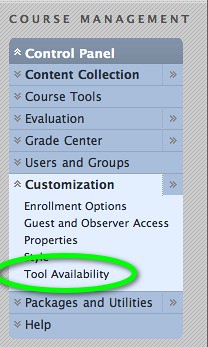
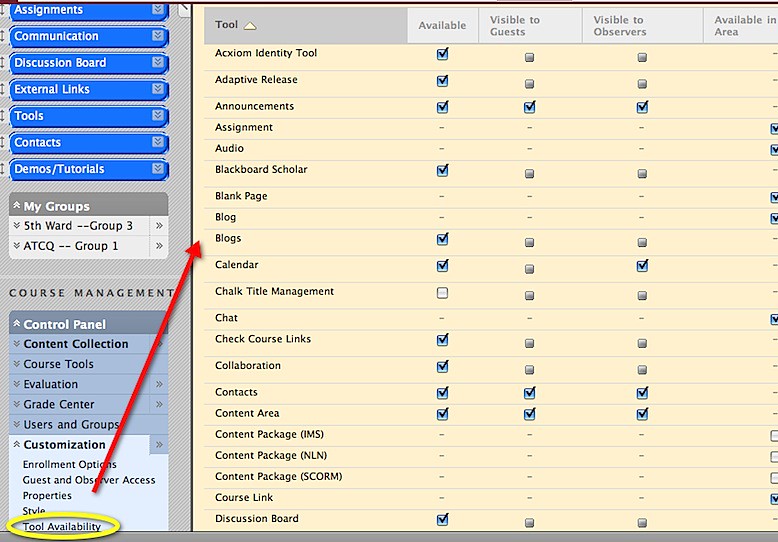
To remedy this, go to the *CUSTOMIZATION* menu under the CONTROL PANEL and select TOOL AVAILABILITY. 
You will see the following page and will have the opportunity to select or deselect items.


t3.jpgTo access the tools, click on *TOOLS* in your menu. 
t2.jpgIf you don't see a tool...go back back to TOOL AVAILABILITY. Be sure to SAVE your options before clicking on another menu item.
t4.jpg
For more information on Blackboard tools, see the annotated User Manual.

Thursday, February 10, 2011

Student Engagement in Higher Education

This is a repost of an Educause article shared with faculty in the spring newsletter the Center for Academic Technology had in the Spring of 2010.  The post mentions the National Survey of Student Engagement, the full report is worth the read.
10-20-2010 1-57-22 PMAccording to their website:
The NSSE annually collects information at hundreds of four-year colleges and universities about student participation in programs and activities that institutions provide for their learning and personal development. The results provide an estimate of how undergraduates spend their time and what they gain from attending college.
 

What Is Student Engagement, Anyway?

by Linda Deneen
When EDUCAUSE Quarterly asked me to be a columnist on the topic of student engagement, my first question was, “What is student engagement?”

To answer this question, I started with the word “engagement.” Several dictionaries could not provide a definition that seemed to come close to what I think people mean when they talk about student engagement. Finally, I turned to the Oxford English Dictionary and found this definition: “the fact of being entangled; involved or entangled conditions. Obs.” It is interesting to me that the best definition I could find is now obsolete. Presumably our extensive use of this word in higher education will revive this definition.

So let’s turn next to the definition of “student engagement.” Wikipedia lists multiple definitions and cites many academic articles written throughout the 1990s and 2000s. This is convincing evidence that the definition of student engagement is itself complex and broad. George Kuh’s definition illustrates this complexity:
The engagement premise is straightforward and easily understood: the more students study a subject, the more they know about it, and the more students practice and get feedback from faculty and staff members on their writing and collaborative problem solving, the deeper they come to understand what they are learning and the more adept they become at managing complexity, tolerating ambiguity, and working with people from different backgrounds or with different views.1
A notable and enduring study of student engagement, the National Survey of Student Engagement (NSSE), has been administered since 1999. According to the NSSE website, “The project will involve in-depth investigation of institutions that show a pattern of improved NSSE results over time to identify the activities that led to improved performance and to draw lessons to inform improvement efforts on other campuses.” Many institutions, including my own, use the NSSE survey as one instrument in an overall assessment plan.

Since I am writing this column for EQ, it is best to ask how technology can contribute to our efforts to engage students. The most recent issue of EQ (vol. 32, no. 4, 2009) provides this definition: “Student engagement is a rendezvous between learning and the digital tools and techniques that excite students.” I encourage readers who want more information about student engagement and technology to spend some time with this theme issue.


Another resource on student engagement and technology is the “EDUCAUSE Student Guide to Evaluating Information Technology on Campus.” The four sections of this guide are Academic Experience, Administrative Experience, Student Life, and Services and Fees. All four of these areas offer ways to engage students with the institution. Students must interact with the institution to be admitted, to enroll in classes, to pay their tuition and fees, to learn successfully (both face to face and online), to participate in extracurricular activities, to do research, to graduate, to find a job, to continue their education, and to participate as active alumni. Certainly faculty members play a keyrole in student engagement, but customer service staff and learning environments are also critically important.


How do learning environments support student engagement? At my institution, IT staff supporting faculty share a fundamental belief that pedagogy should drive learning environments, and not the other way around. We avoid technology for the sake of technology and actively seek those technologies that will improve teaching and learning. Technologies that enhance student engagement are of particular interest to us. For example, clicker technology caught on early here, and we moved swiftly to set a standard for clickers, believing that a standard would save students money and improve support. These devices have been particularly helpful in large classes, where it can be difficult to engage all students and move beyond the sage-on-the-stage model. Although faculty members began using clickers to check whether students grasped facts and vocabulary, they quickly moved to more challenging questions that promoted higher-level reasoning and critical thinking. According to LeAne Rutherford, who facilitated an Archibald Bush Grant group on increasing the level of higher order questioning,
“Technologies that encourage students to engage with their course materials and to take an active role in learning promote retention and understanding.”2


Finally, why do we want to engage students? Who among us does not believe that engagement with the institution attracts students, ties them to us, makes them part of our community, and motivates them to succeed in their academic careers? My own relationships with faculty mentors, fellow students, social opportunities, and institutional services throughout my years as a student pin me firmly to higher education.

Entangling students in our institutions in multiple, positive ways helps them to remain with us, learn more effectively, enjoy their student experience, and prepare for life outside higher education.

In subsequent columns, I will address some aspects of student engagement in more detail. I look forward to engaging with you, the readers, on this interesting and important topic.
Endnotes
  1. George D. Kuh, “The National Survey of Student Engagement: Conceptual and Empirical Foundations,” New Directions for Institutional Research, vol. 2009, no. 141 (March 9, 2009), pp. 5–20.
  2. LeAne H. Rutherford, personal communication.
© 2010 Linda Deneen. The text of this article is licensed under the Creative Commons Attribution-Noncommercial-No Derivative Works 3.0 license.
Source: http://www.educause.edu/EDUCAUSE%2BQuarterly/EDUCAUSEQuarterlyMagazineVolum/WhatemIsemStudentEngagementAny/199393

Monday, February 7, 2011

Creating and Managing Groups in Blackboard

Blackboard 9.1 has multiple ways to engage students in group activities.  Moreover, the grading and assignment capabilities have been streamlined so there are less ‘clicks’ involved to complete a group assignment.

Before you can create group assignments, you must first setup groupsusergroup.jpg.
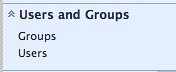
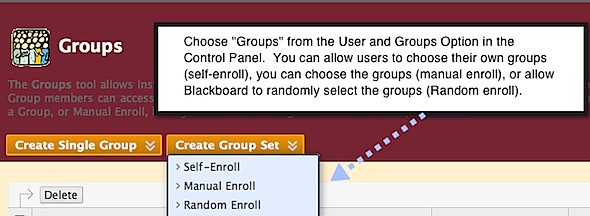
Go to the Control Panel and open the panel *USERS AND GROUPS* then select *GROUPS*


You can form a single group or form groups for all of the students:
gr2.jpg

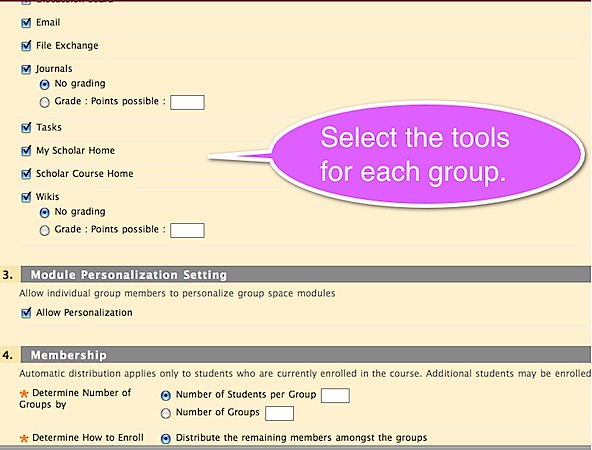
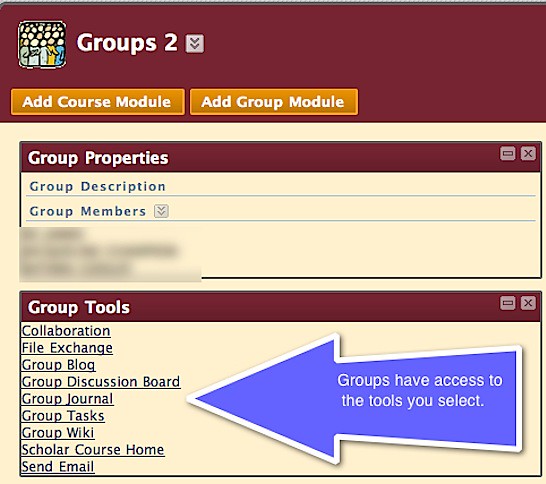
When creating groups, you also have the ability to select which tools and interactions will be available for the group.  You can always modify these options should you choose to add a tool later.

gr3.jpg

This is how the groups will look. You can add group assignments or grade participation within the existing group tools.
Once the groups are formed, you will have the opportunity to create projects for individuals or for groups.  See the links at the bottom of this post for more information on group work.
gr4.jpg

For more information on Groups and Blackboard, view this annotated version (also below)of the Blackboard 9 User Manual.

If you need further help, please call the 24 hour Blackboard helpline at 202-274-5665 or toll free: 877-736-2585.

Thursday, December 16, 2010

Mapping Web 2.0 Benefits to Known Best Practices in Distance Education


This post is from the University of Maryland University College's online journal --> http://deoracle.org/

--------------------------------

The last several years have been filled with enthusiastic discussion regarding Web 2.0 technologies and their positive, dynamic enhancements to a user’s experience on the Internet. This same wave has somewhat belatedly crashed over the realm of online education, and it has been a much-mulled subject ever since. The reason is for this is simple: The potential positive impact of Web 2.0 tools on the online learning experience is believed to be myriad and vast. 

Recent research has confirmed and identified benefits to the use of Web 2.0 technologies within the online classroom. Such benefits can be mapped to known best practices from the distance education literature to help enhance and optimize their potential positive effects within the online classroom. This article outlines the suspected and documented benefits of Web 2.0 technologies and links them to known best best practices in distance education.

Read the Full post: Mapping Web 2.0 Benefits to Known Best Practices in Distance Education by L Odom

Tuesday, December 14, 2010

How Long does Change Take?

"The Art of Great Design" is an interesting piece on the need to focus on design when sharing information online.  Proven is a publication which deals with performance, training, workforce and development.


Here's a quote from the article (probably need to print to read):
Not that long ago, it was impressive when someone made information available via the Internet -- no matter how cumbersome or unappealing the presentation.Contemporary consumers expect sophisticated navigation and palatable aesthetics at the very minimum.


When I first started teaching in 1999, I used to put stuff on the web on my own.  As a web designer (at least back then), I was always conscious on how the information was represented.
Taken with my camera phone...low budget technology
This graphic above caught my eye, how long does it really take for CHANGE?


Anyway, as I started to read the article, I made another connection:


I just completed a Quality Matters certification course where online learning design is the primary focus.  One question I've had is: "Doesn't good online learning design encompass good design? Don't you need to be an effective 'designer' before adding the words 'online' in front of it?"


While learning management systems like Blackboard and emerging standards like Quality Matters are streamlining design, they don't assist with the creativity needed to effectively stimulate folks (traditional students and otherwise) online.


Here's what I wrote in the discussion board of a 6 week Online Teaching course I am lurking/working in. 
QM doesn't teach creativity.  I think what is SORELY missing from QM design is the notion of creativity.  Not just, folding napkins creativity, but online learning creativity.  There is a visual aspect to the Internet.  For those who have never designed a webpage or any other Internet medium (blog, newsletter... something), I think it is nearly impossible to be a stimulating online educator.  Here's a Fast Company article on Creativity:  http://www.fastcompany.com/1671590/the-creativity-gap.  The quote I like:
Thankfully, there is hope. According to a joint study between Harvard and Intsead, it turns out that creativity is 85% a learned skill. That means that all of us, even on our groggy days, have 85% the creative potential as Mozart, or Picasso, or Da Vinci. We simply need a process to tap into this valuable natural resource.Creativity is like a muscle--we all have the capacity to build muscle mass if we exercise. If we fail to do so, our muscles atrophy. The same is true with creativity. By embracing and exercising our creativity muscles, we unleash a wellspring of insight. This innovation will drive success in both your company and your career. For dozens of exercises, links, resources, and best practices, click here.
Your thoughts?

Tuesday, December 7, 2010

Teacher vs Learner Centered Learning

I'm typically the person in the room who uses words that end with '-centric', ego-centric & exo-centric are personal faves as well as user-centric. Before coming to UDC, I facilitated a yearlong blended learning fellowship [view their screencasts], I am often caught talking about learner-centric activities.

I often think that most educators 'teach they way they were taught'. When transitioning to an online setting, this is academic suicide. We must take the view of the learner when creating lectures, designing activities, and developing assessments.

Some of the literature uses the word "connectedness" to describe the paradigm shift away from teacher-centered instruction.

Screen shot 2010-04-23 at 12.38.57 PM.png One of the reasons I chose the book "Blended Learning in Higher Education" was to highlight the need for community and connectivity in an online environment.

More than a technology book, it delves into issues of pedagogy in the online classroom and provides a 3 point framework to follow called the "Community of Inquiry". [view PPT]

While not covered in the book, the term 'blended learning' does not embody the 'learner-centric' paradigm...it's teacher-centric:) I won't argue against it, but food for thought.

Taken from the publisher's website, the book has the following main areas:
  • Outlines seven blended learning redesign principles
  • Explains the professional development issues essential to the implementation of blended learning designs
  • Presents six illustrative scenarios of blended learning design
  • Contains practical guidelines to blended learning redesign
  • Describes techniques and tools for engaging students
From all accounts, fellows did find the book helpful. Moreover, they agreed that building a course in a blended manner was a great way to redesign their course; allowing for new ideas to be implemented into an existing curriculum. Here’s another nice article on the paradigm shift from instructional vs. learning paradigm.

Tuesday, November 30, 2010

Student 2.0 -- Teaching a Wired Generation

The New York Times recently published an interesting set of articles and videos on teaching the wired generation.

A brief blurb (read the full article):

On the eve of a pivotal academic year in Vishal Singh’s life, he faces a stark choice on his bedroom desk: book or computer?

By all rights, Vishal, a bright 17-year-old, should already have finished the book, Kurt Vonnegut’s “Cat’s Cradle,” his summer reading assignment. But he has managed 43 pages in two months.
He typically favors Facebook,YouTube and making digital videos. That is the case this August afternoon. Bypassing Vonnegut, he clicks over to YouTube, meaning that tomorrow he will enter his senior year of high school hoping to see an improvement in his grades, but without having completed his only summer homework.

Monday, November 8, 2010

Eight Ideas for Supporting Faculty

[Repost from Blackboard.]
I liked this post from Blackboard which discusses how learning professionals canTechnology-Support assist faculty with technology.   I'd be interested in hearing from faculty which of these are most effective.  

Read the full post

Eight Ideas for supporting Faculty
Fully online and Hybrid courses take a lot of effort to create.  It is not as easy as it looks and often times faculty are left to do the brunt of it.  Over the past 12 years of e-learning, many great ideas for supporting faculty have evolved.  These have been adapted to meet the needs of faculty, and the size of the support staff at many institutions.
1. Show and Tell.  Faculty who are new to e-learning want to see examples of what their colleagues are doing.  Some institutions have show and tell sessions and invite faculty to come show their own courses, while others get permission to show courses and an instructional designer or other e-learning support person will show them off.
2. Online course.  There are some institutions that require instructors who wish to use Blackboard, to go through an online course created for teaching them how to use the software.  This gets instructors into the very software they will use, and they get an opportunity to use the very tools their students will.  If done properly, it will give instructors ideas on what is possible.
3. Faculty Mentors.  Smaller schools without large support staff have use the Faculty Mentor model with great success. The core Blackboard support staff on campus will train faculty from various departments and then they work with faculty within their department to mentor and train them.  This can be very successful, but it can also put a heavy burden on the mentors. Selecting the mentors is the key to success and it is usually early adopters who have a passion for this technology.
4.  Online tutorials.  Putting easy to follow self help documents and tutorials online can really help faculty go it on their own.  Utah State University has had great success creating both text and video/audio based tutorials for faculty who are using Blackboard Vista.  You can see some examples here. http://it.usu.edu/tutorials.
5.  Use Templates.  Having a general course design and plan promotes consistency throughout the University, and makes it easy for faculty to get started.  Instead of having to start from scratch and spend a lot of time playing around, faculty and instructors can focus on creating content.  One school estimates it saves 25% - 30% of online development time by having a course template/shell available.
6.  Build it for them.  Faculty time, especially those on the tenure/research track is very valuable and limited.  Why not build the entire course for them.  Use the templates and a good checklist to sit down with them and chart out a plan for the course.  Commit them to get you the content on a timeline, and then build it for them.  Use examples of other classes to show them what the end result will be, and customize where needed to meet the learning objectives of the course and each unit.
7.  Online Office Hours.  Just like faculty have office hours, you can provide excellent support to them by having online office hours.  There are even examples in consortia where each institution takes a turn monitoring online office hours.
8.  Bring technology support together.  Supporting the development of e-learning requires graphic artists, web designers, course developers, instructional designers and media specialists.  If these are in different groups, it makes it harder to get the job done. Experience shows that when these experts are not part of the e-learning group (the group supporting the faculty with Blackboard technology) then they “don’t get it,” and may not be able to provide the best solutions.  Experience shows that when these experts work hand in hand with the faculty, and instructional designers/Bb support staff, then the outcome is a far better project.

You should also avoid one-person operations in individual colleges or departments.  They tend to be islands and although will get the job done, do not get the real opportunity to collaborate on a regular basis with others.  Synergy is created when designers and support persons from varied backgrounds and skill levels get together and share.  Each brings their strengths and the outcome is bigger than the sum of the parts.

Friday, October 22, 2010

Stepping Up Your Web 2.0 Game

As a trainer, I've probably introduced or explained Web 2.0 about 50 times. At least! I came up with this little graphic to help educators understand that Web 2.0 is not something that you instantaneously DO, it's kinda like a lifestyle, a werb not a noun.

The International Society for Technology in Education (ISTE), provides some great standards for educators. If you haven't, do take the time to visit their National Educational Technology Standards (NETS) page.

To make the connection to jobs and the workforce, check out the Partnership for 21st Century Skills, they have a nice framework showing the connection between school success and workforce success.[President Obama quotes the need for 21st Century Skills in a speech (as covered by CNN.com)]


The following graphic from Radar Networks shows some of the tools associated with Web 1-4.  They all have some type of learning curve, it's best to jump on the train now!


** View this post for definitions of Web 1 through web 4.

The following graphic attempts to provide some steps for getting involved with Web 2.0.
Start slowly, make friends, and share your knowledge with others.

Slide16.jpg
Graphic by Andrew J Ryan -- don't steal!  

Wednesday, October 20, 2010

Blackboard 9.1 Features

I created this Tagul word cloud as an introductory activity for my Intro to Blackboard workshops. Faculty often come into the workshops with varying levels of readiness and I typically ask the room which (if any) of these words are they unfamiliar with as it relates to online learning.

Unlike Wordle, Tagul can be setup to feed the words into a search query (you can choose which one) so when the user clicks on it, they go to that search result. It also zooms in on words to make them bigger, a little visual animation not yet in Wordle.

In the Tagul below, clicking on any of the terms will bring you to the Blackboard forums where that term is discussed/explained.


This semester, the Center for Academic Technology is offering workshops on Blackboard and other technology related topics.  Sign up now!

Tuesday, October 12, 2010

7 Things ... A Great Resource from Educause

I've used Educause as reference in multiple workshops. Frequently, I find myself ushering faculty to their "7 Things" website, one of their Learning Initiatives.Picture 34.png

These 2 page primers are on emerging learning technologies and written FOR higher education professional and educators. There's nothing worst than a great resource which only discuss K-12 but not higher education perspectives.

Their latest topic: **Online Team-Based Learning** joins nearly 40 other briefs including: Collaborative Annotation, Second Life, FlipCams, and Personal Learning Environments.

All of the reports are free and worth the read.

Friday, September 17, 2010

Rubrics and Blackboard

This lesson will discuss the creation of rubrics in Blackboard. Also check out the Blackboard page on rubrics online.

Access Rubrics

media_1283352450400.png
Select Rubrics from the Course Tools menu. If you don't see the Rubrics options, view this short tutorial to add it. Note, you must CREATE the rubric before you associate it with an assessment.

Create New Rubric

media_1283359881133.png
If you have already created a rubric, you will see it on this screen (see the PRACTICE rubric). More than likely, you will need to CREATE a rubric

Name rubric

media_1283359914391.png
You may have multiple rubrics, be sure to name them appropriately. The description may be useful to you , but is not mandatory.

Define Rubric

media_1283359929537.png
Blackboard provides a simple template. You can add rows/columns and assign point values too.

Modifying Columns

media_1283360045494.png
You can edit a column or row by clicking on the chevron (circled) and pressing EDIT. Note in this picture, the "Show Point Range" box is checked and now the points aren't fixed, but can be a range.

Connecting the Rubric with an Assessment

media_1283360791442.png
You must go to the Control Panel and access the "Full Grade Center" to connect a rubric with an assessment.

Select the Assessment

media_1283361181615.png
Click on the chevron in the column header. If the assessment can support rubrics, select the "View and Add Rubrics" option

Select the Rubric

media_1283361209351.png
Select the rubric you wish to use with the assessment by pressing ADD RUBRIC.

Confirm Selection

media_1283361235053.png
Make sure the checkbox is selected for the rubric you wish to connect with the assessment.

Changed Your Mind?

media_1283361251383.png
If you wish to view the rubric, slect the icon with the two overlaid squares (on the left). To disassociate (it won't delete) the rubric from the assessment, press the X.

Grading with the Rubric

media_1283362076182.png
When you start grading, press VIEW GRADE DETAILS to view the student's submission.

Viewing the Rubric

media_1283361670097.png
When you are in the grading screen, you can view the rubric (as a reminder). Students will also be able to see the rubric, although the score for each section won't be visible.

View short Video on Rubrics

Be sure to turn the volume up. Here's the link to the tutorial: http://screencast.com/t/OTk3Njk5NWEt

Tuesday, September 14, 2010

What does a high quality online course look like?

An excellent site (from California State University) for assessing online learning. Check it out:

[taken from]
This site is designed to answer the question being asked: What does a high quality online course look like? It is our hope that instructors and instructional designers will use this site to learn more about the Rubric for Online Instruction, and be able to view examples of exemplary courses that instructors have done in implementing the different components of the rubric.

Screen shot 2010-04-25 at 8.23.51 PM.png

Monday, September 13, 2010

Enticing Teachers To Try Technology

While this article from The Journal focuses on K-12 technology integration, many colleges and universities are also struggling with the same issue.

Technology is a marvelous tool for enhancing the curriculum, engaging the students, and bringing life to an antiquated classroom. Most educators will agree this premise is true. But how do you get teachers to take the leap and dive into technology integration in their classrooms? One solution some districts have tried is to equip all classrooms with technology--interactive whiteboards, documents cameras, LCD projectors, etc. The expectation is that if they equip it, the teachers will use it.
[more]

A recent Educause survey listed “faculty adoption and innovation in teaching and learning” as the number  4 challenge in Teaching and Learning.

As the Internet augments the learning landscape and students become more immersed in online environments, it’s often the instructor who is least equipped to utilize new(er) technologies.  Colleges attempt to entice faculty to enhance their technology skills with everything from free laptops (at Virginia Tech) to incentive pay (Univ. of Nebraska.)

The University of the District of Columbia is currently in the midst of formalizing many of its technology offerings and support services.    While ‘entice’ wouldn’t be the right word to use for our efforts, we’ve been excited by the attendance at our most recent technology boot camp and have reworked our fall technology offerings (see below) to better fit faculty needs.  We invite your comments on how your institution ‘entices’ faculty to try new(er) technologies.

To register for an upcoming LRD workshop, go to Blackboard [udc.blackboard.com] and click on the tab in the far right corner labeled WORKSHOPS.  Space is limited so please register early and often!

Friday, September 10, 2010

October Workshop Schedule

The document below links to the October workshop offerings from the Center for Academic Technology.  To view workshop descriptions, click here

Tuesday, September 7, 2010

Teaching College Courses Online vs Face-to-Face

onlAn interesting article from The Journal on the emerging trend in higher education to bring more courses online.

Experiencing a huge demand for college courses taught over the Web and not wanting to be swept aside by competitors from the commercial sector, universities are often pressuring faculty to teach courses online. Many faculty members have never taught online, and therefore wonder what they are getting themselves into. What are the differences between teaching online and teaching face-to-face? What can faculty members expect from the experience of teaching college courses on the Web?
Read the full article

Wednesday, September 1, 2010

September Workshop Schedule

The document below links to the September workshop offerings from the Center for Academic Technology.  To view workshop descriptions, click here

Monday, August 30, 2010

5 Strategies for Using Wikis in the Classroom: Engaging Students in Technology Projects that Support Learning

Educators are constantly seeking new strategies for using Wikis in the classroom. This is especially true for teachers who have formulated some ideas; however, they are still looking for additional ideas. Even teachers who have been using this technology for quite some time are on the lookout for new ideas. Regardless of being new to Wiki or a veteran, new strategies and techniques for engaging students are just around the corner.

Wikis are one of the easiest Web 2.0 applications on the Internet to use, no downloading of software required and works just like a word processing program. The use of this technological tool has grown tremendously in the past years with more than 180,000 in classroom use today (Wikispaces for Educators Website, June 2009). They are free for educators, advertisement free, and have controlled access to ensure student information remains private.

Read more at Suite101: 5 Strategies for Using Wikis in the Classroom: Engaging Students in Technology Projects that Support Learning http://teachingtechnology.suite101.com/article.cfm/5_strategies_for_using_wikis_in_the_classroom#ixzz0l2Zob9YX


5 Strategies for Using Wikis in the Classroom: Engaging Students in Technology Projects that Support Learning

Wednesday, August 18, 2010

Blackboard 9.1 comes to UDC

Go to http://udc.blackboard.com to access the site
Blackboard 9.1 is HERE.  While not a total redesign, the latest version [see What's New] of the Learning Management system allows faculty an opportunity to interact with students in new ways.  

Many of the Web 2.0 tools which have existed outside of academia are now embedded within the Blackboard.  Blogs, wikis, journals, and electronic portfolios are just a few of the enhancements to the new system.

Click here for an annotated version of the Blackboard user's guide which has quick links to many of the new features.

REGISTER FOR CLASSES
Picture 26.png
The far right tab (top right) allows you to register for workshops
The Center for Academic Technology  is conducting workshops to familiarize faculty with the new features.

You can register by going to the Blackboard site and clicking on the **Training** Tab.  Seats are limited, so be sure to register soon.


NEW LEARNING RESOURCES DIVISION WEBPAGE
Over the summer, the LRD webpage was revamped to include many new informational resources. Check it out at: http://lrdudc.wrlc.org/

Also, the Center for Academic Technology's webage contains quite a few resources related to Blackboard.  Click on the "Online Learning" tab to access the documents.  Below is a copy of the Frequently Asked Questions page from the website:


Stay tuned to this space for more Blackboard and learning technology information . . . we'd love to hear your comments as well!