Part 3 of our
Information Literacy Series by
Michael Fitzgerald, Electronic Services Librarian
Those of us reading these words live in a world where information is plentiful. Whatever your search is, finding
something isn’t such a challenge. The many subscription resources available to you at UDC will give thousands and thousands of results. Finding the
right thing can be more difficult and the next question is what to do once you have found something you want to use. Sometimes it can feel like a full-time job just keeping track of all the information you need for the many projects you are working on each semester.
There are tools that can help with this.
Zotero is a free plug-in for the Firefox browser (no others at this point, but
Firefox is free too!). It does three important things. It helps you
collect different kinds of citations from a variety of sources all in one place; it lets you
organize and annotate those citations; and it works with your word processor to
create references and bibliographies, all formatted according to the style you choose. There’s much more it can do, but those are just the top three.
Wherever you find it — whether in the
library catalog, one of
our many subscription databases, or on
Amazon,
YouTube, or somewhere else — the information can be collected and stored in Zotero and will be ready for you to use later in papers and projects so you can cite your sources appropriately. Notecards were a good idea, but they are so last century. Zotero does all that and much more.
The award-winning Zotero software was developed by the
Center for New Media and History at
George Mason University, one of our partners in the
Washington Research Library Consortium.
There’s
more information available, including video tutorials on using Zotero. As part of its information literacy services, the UDC
Learning Resources Division offers instruction on Zotero. If you are interested in a session, please fill out our
online form. We look forward to helping you move forward with this cutting-edge tool.

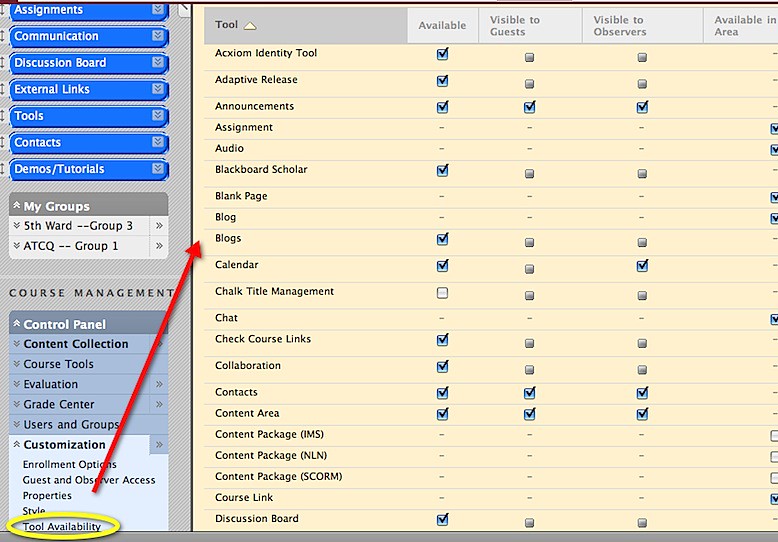 To access the tools, click on *TOOLS* in your menu.
  If you don't see a tool...go back back to TOOL AVAILABILITY. Be sure to SAVE your options before clicking on another menu item.